2019. 10. 22. 10:12ㆍProgramming/Swift
본 내용은 2019년 2월 28일에 메모장에 작성된 것을 복붙한 것이다.
기억이 잘 안나지만, 이게 작동이 되었는지는 알 수 없다.
다만 했다는 기억만으로 이렇게 남겨 놓는다.
1. Github repository 만들기
2. cocoaPods 사이트에서 동일한 이름이 있는지 확인하자.
ex. https://cocoapods.org/pods/mySamplePods 로 접속하던가, 사이트내에서 검색을 해보아라.
3. cocoaPods 프로젝트 만들기
|
$ pod lib create demoPods /Users/sk/.rbenv/versions/2.3.1/lib/ruby/gems/2.3.0/gems/cocoapods-1.6.1/lib/cocoapods/executable.rb:89: warning: Insecure world writable dir /Users/sk/Documents/2016/hadoop/hadoop-1.2.1/sbin in PATH, mode 040777 Cloning `https://github.com/CocoaPods/pod-template.git` into `demoPods`. Configuring demoPods template. /Users/sk/Documents/2016/Development/cocoaPods/demoPods/setup/TemplateConfigurator.rb:207: warning: Insecure world writable dir /Users/sk/Documents/2016/hadoop/hadoop-1.2.1/sbin in PATH, mode 040777 security: SecKeychainSearchCopyNext: The specified item could not be found in the keychain.
-----------------------------------------------------------------------------------------------------------------------------
To get you started we need to ask a few questions, this should only take a minute.
If this is your first time we recommend running through with the guide: - https://guides.cocoapods.org/making/using-pod-lib-create.html ( hold cmd and double click links to open in a browser. )
What platform do you want to use?? [ iOS / macOS ] > iOS
What language do you want to use?? [ Swift / ObjC ] > Swift
Would you like to include a demo application with your library? [ Yes / No ] > Yes
Which testing frameworks will you use? [ Quick / None ] > None
Would you like to do view based testing? [ Yes / No ] > No security: SecKeychainSearchCopyNext: The specified item could not be found in the keychain. security: SecKeychainSearchCopyNext: The specified item could not be found in the keychain. security: SecKeychainSearchCopyNext: The specified item could not be found in the keychain. security: SecKeychainSearchCopyNext: The specified item could not be found in the keychain. security: SecKeychainSearchCopyNext: The specified item could not be found in the keychain. security: SecKeychainSearchCopyNext: The specified item could not be found in the keychain.
Running pod install on your new library.
/Users/sk/.rbenv/versions/2.3.1/lib/ruby/gems/2.3.0/gems/cocoapods-1.6.1/lib/cocoapods/executable.rb:89: warning: Insecure world writable dir /Users/sk/Documents/2016/hadoop/hadoop-1.2.1/sbin in PATH, mode 040777 Analyzing dependencies Fetching podspec for `demoPods` from `../` Downloading dependencies Installing demoPods (0.1.0) Generating Pods project Integrating client project
[!] Please close any current Xcode sessions and use `demoPods.xcworkspace` for this project from now on. Sending stats Pod installation complete! There is 1 dependency from the Podfile and 1 total pod installed.
[!] Automatically assigning platform `ios` with version `9.3` on target `demoPods_Example` because no platform was specified. Please specify a platform for this target in your Podfile. See `https://guides.cocoapods.org/syntax/podfile.html#platform`.
Ace! you're ready to go! We will start you off by opening your project in Xcode open 'demoPods/Example/demoPods.xcworkspace'
To learn more about the template see `https://github.com/CocoaPods/pod-template.git`. To learn more about creating a new pod, see `http://guides.cocoapods.org/making/making-a-cocoapod`. |
- 위 keycahin을 찾을수없다는 메세지가 나오는데 모르겠음.
- 명령어를 실행시킨 위치에서 하위 폴더가 생성 될 것이다.
- Xcode가 자동 실행된다.
4. mySamplePods.podspec 수정
- 수정할 대상은 s.name, s.version, s.homepage 등이 있다.
- 하지만 주어진 포맷대로 수정을 해보았지만 오류가 많다.
- 나의 방법은 그동안 평소 잘 쓰던 다른 사람들이 만들어 놓은 cocoapods GitHub 라이브러리 들어가서 podspec 파일을 가져와서 그대로 수정해주면 된다.
5. 파일을 생성하고 스위프트 버전을 넣어준다.
|
$ vi .swift-version 4.2 <- 버전 |
6. pod lib lint
- .podspec 파일을 맞게 작성했는지 체크를 한다.
7. Error 체크
- 에러가 날 것이다. 여러가지 에러가 나온다. 정말 울화가 치밀어 오른다. 너무 많은 에러를 접했는데 그나마 자주 등장하는 에러만 적어 보았다.
|
## 1 ## WARN | [iOS] swift: The validator used Swift 3.2 by default because no Swift version was specified. To specify a Swift version during validation, add the `swift_version` attribute in your podspec. Note that usage of the `--swift-version` parameter or a `.swift-version` file is now deprecated.
## 2 ##
## 3 ##
## 4 ## |
8. git push
|
## $ git init => 존재한다고 하면 그냥 무시.
|
9. CocoaPods 등록 : 인증작업
$ pod trunk register myEamilAddress@gmail.com mySamplePodsTrunk --description=“mySamplePods.PG"
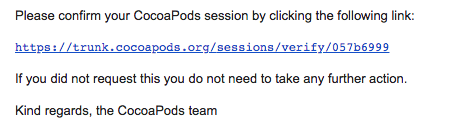
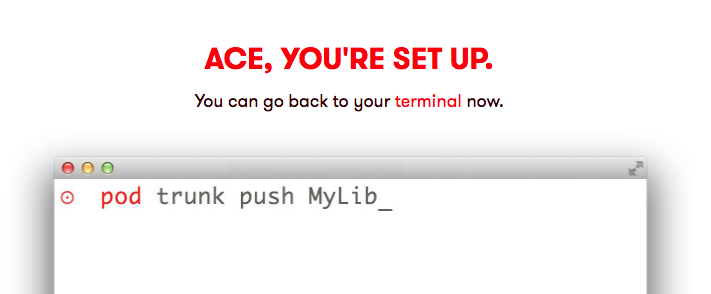
10. CocoaPods 등록 : 업로드
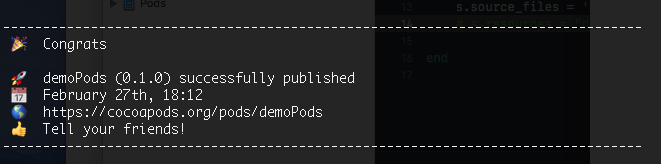
| $ pod trunk push demoPods.podspec --swift-version=4.2 |
에러가 나서 확인을 했더니, .podspec 파일의 값이 리셋되어 있는 것이 아닌가 ㅠㅠ
다시 수정하여 재실행 하였다. 결국에는 아래와 같이 나왔다. 성공이다.
왜 수정이 되었는지 알수없다. 다만 git push 할때 강제로 해서 그럴 것 같다는 생각이 든다.
https://cocoapods.org/pods/mySamplePods 접속을 해보면 접속이된다.
그러나 이 작업이 성공하지 못하면, 잘못된 페이지라고 나올 것이다.
11. 이제 사용 해볼까?

Xcode를 보면 Pods 프로젝트에서 Development Pods 에서 작업을 하면 되는 것 같다.
Development Pods > mySamplePods > Pod > Classes > *.swift —> Classes 없으면 만들어 주면 된다.
수정을 다 했다고 가정하고, .podspec 파일 버전업을 시켜준다.
그리고 위에서 했던 것 처럼 git 에 올리고 cocoapods에 올리면 된다.
cocoapods 사이트가서 확인해보면 버전이 올라간 것을 확인 할 수 있다.

12. 테스트로 임시적으로 프로젝트를 만들어서 pod install을 해보자.
'Programming > Swift' 카테고리의 다른 글
| xcode git 연동 문제 (0) | 2020.01.16 |
|---|---|
| [swift] slide animation (0) | 2019.11.21 |
| [iOS13] 당황스럽게 변경된 점 (0) | 2019.10.22 |
| [Swift] opacity (0) | 2019.03.22 |
| [Swift] UserDefaults.standard int형식으로 불러오기 (0) | 2019.02.18 |